Student accounts on Scratch are designed and intended for use in a classroom or educational setting. Student accounts are temporary. When your class ends or your teacher is no longer active on Scratch, student accounts are automatically closed, which means you'll no longer be able to log in to that account. You'll lose access to any unshared projects and will no longer be able to edit or unshare shared projects. Accounts are closed, not deleted, so any shared projects will still be publicly visible, and you can remix those shared projects using a standard Scratch account at any time.
Student accounts in a closed classroom now have the option to request conversion to a standard Scratch account. To request a conversion, please use the Contact Us form and include the following information:
- Your Scratch username
- The name of the teacher who created your student account
- The email address on the account (this is often your teacher's email address)
- Your date of birth
- The title and a detailed description of a project that is in your account's Unshared or Trash folder. This information helps us verify that you own the account.
If you would prefer to continue using Scratch outside of your classroom or if you’re currently using a student account in an active classroom and have shared or unshared projects you’d like to keep after your class has ended, we would encourage you to work with your parents or guardians to create your own standard Scratch account. You can create a new account here. After creating a standard account, we recommend that you remix any shared projects or save copies of projects from your student account into your standard Scratch account. To save a copy of a shared or unshared project to another account, on the project editor screen, go to File > Save to your computer (this will generate an .sb3 file). Once logged into your standard Scratch account, create a new project, then go to File>Load from your computer (and load the sb3 file). You can remix shared projects using a standard Scratch account at any time, but when a class ends, and your student account is closed, you will no longer have access to unshared projects.
If you are unsure if you have a student account, you can look for the “Student of: [class name]” label on your profile. It will appear just below your username. Like this account:

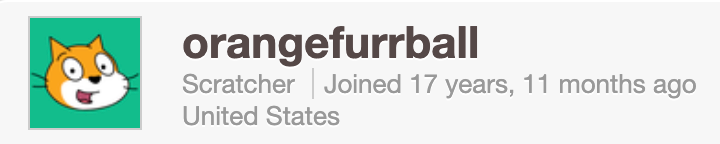
If you already have a standard Scratch account, the label on your profile will say “New Scratcher” or “Scratcher” only, like on this account:
Was this article helpful?
That’s Great!
Thank you for your feedback
Sorry! We couldn't be helpful
Thank you for your feedback
Feedback sent
We appreciate your effort and will try to fix the article